Emergency Response & Accountability App for Schools
One tap sends the alert to every phone on campus. Every classroom reports its status back. Leadership watches the school resolve room by room — and the drill report writes itself.
Installs from a link — no app store, no device management.
Each school runs on its own database, under its own branding.
One alert, one action
Leadership sends the alert from their phone. It arrives on every staff device with the instruction attached — so nobody has to remember the protocol under pressure.
Drop, cover and hold on. When the shaking stops, evacuate to the assembly point and report your status.
Leave by the nearest safe exit — no elevators. Walk calmly to the assembly point and report as soon as you are safe.
Lock the room, lights off, away from windows, devices silent. Report your status once you are secure.
The emergency is over. Classes return to normal activity and await any further instruction from administration.
The problem ERA was built for
A drill is not a test of the alarm. It is a test of whether anyone can say, with certainty, that every child is where they should be.
Who uses it
Everyone opens the same app and lands where their job is. Nobody scrolls past information that isn't theirs.
Mark the group safe, flag a student missing, call for help, add a note. Signing in with a school account is enough — there is no staff list to maintain.
The whole school on one board: safe, need help, medical, still checking. Assign floor sweeps, follow up on a room, send the report when it's over.
Who is in today, homeroom by homeroom, and who is with the nurse. Resets itself each morning at the hour the school sets.
Students currently in the clinic, a running note on each one, and a discharge back to class. Every visit stays in the history.
Branding, rooms and floors, rosters, report wording, email routing, notifications. The school controls its own setup — no code, no ticket.
Inside the app
No complicated menus or cluttered screens. Simple, focused interfaces designed specifically for emergency situations.

Bypass email delays. Push notifications instantly wake up devices to alert staff the moment a drill or emergency is triggered.
Admins see a real-time count of safe, missing, and medical statuses across the entire campus, updating instantly.
A real-time messaging thread shared between all Staff and Admins. Auto-clears when the drill is reset.
Staff submit location and roster accountability instantly without relying on paper, runners, or radios.
Why ERA is different
Most emergency apps start from a static staff list and ask everyone to check in. ERA runs your school's live daily attendance and clinic records. When an alert goes out, it already knows who is actually in the building this morning, not who was on a roster in September.
This is the single hardest thing for a generic mass-notification tool to replicate. By integrating daily attendance and the clinic log directly into the core loop, ERA knows exactly who is absent or resting with the nurse before the drill even starts. Accountability isn't estimated; it is real, instant, and accurate to the morning.
Broadcast tools only tell people something is happening. ERA tracks the response until every space is accounted for, coordinates the floor sweeps, and automatically generates the final incident report. Alert, response, accountability, sweep, report — one system, one record.
When a homeroom teacher reports safe and no students from their roster are checked in elsewhere, the system resolves that roster itself. Students flagged medical or in the clinic count as present and located. Fewer taps under pressure means fewer false "missing" alarms.
ERA is not a shared multi-tenant database with school data sitting side by side. Each school runs on its own dedicated cloud project, with its own database, credentials, and subdomain. Data is never pooled across customers.
Your school's logo, colours, name, and app icon. Staff install your school's app to their phone, not a vendor's generic tool. No ERA branding is baked into what your staff sees on their devices during a crisis.
English, French, Spanish and Turkish translations are built-in. Each staff member picks their own language, and the choice persists on their device. Built for international-school staff rooms where the caretaker, the nurse, and the maths teacher do not share a first language.
No app store submission, no MDM rollout, no IT ticket per phone. It operates as a Progressive Web App (PWA) — staff simply open a link and save it to their home screen. Updates reach every device on the next open.
Data & access
ERA handles student records, including medical flags. That is treated as the serious responsibility it is, and the terms are put in writing before handover — not buried in a settings page.
Getting started
The order matters, so it is done in one sequence with the school's IT contact. A written setup guide stays with the school afterwards.
The school creates its own cloud project. ERA is deployed into it and belongs to the school from day one.
Logo, school name, app name and icon. Staff install from a link and see the school's identity, not ours.
Classrooms, offices, floors, homerooms and students, imported from a spreadsheet using a supplied template.
Who receives drill and attendance reports, and exactly how those emails read. Previewed before anything is sent.
Access lists set, staff onboarded, and a first practice drill run together before it enters the safety calendar.
About the Founder
"I didn't set out to build software. I set out to fix a drill."
I've spent my career in international schools, leading educational technology and teaching ICT. But ERA didn't start at a desk. It started standing in a drill, holding a roster in one hand and a phone in the other, trying to account for a whole class — and knowing that nobody at the other end of the building could see what I was seeing.
Our procedures lived on paper checklists and group chats. Slips came back after it was over. The report was typed up the next morning from memory, with the times reconstructed. Neither one survives a real incident, and everybody in the building knows it.
So I built the tool I wanted to have that day: staff report their own status from wherever they are, leadership watches every room resolve live, the clinic knows who's in it, and the report writes itself when it's over.
I designed, built and deployed all of it — the app, the database, the alerts, the reporting. It has run through real drills in a working school, which is a different test from a demo. Every feature in it exists because something in a real drill didn't work.
ERA is now available to other schools. If your emergency plan lives in a binder, I'd like to hear from you.
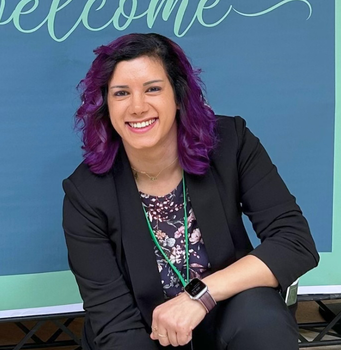
Rawan El AdawiFounder of ERA
Frequently Asked Questions
Bring ERA to your school
Send your school's size and where you are based. You'll get a straight answer on what setup involves, what it costs, and what your IT team would need to do.
Note: EdTech IP is the parent entity of ERA, independently owned and operated by founder Rawan El Adawi.
Enter your school email address and we'll take you to your school's ERA.
Your address is only used to match your school. Nothing is sent or stored, and you sign in on your own school's site.